Draw Story


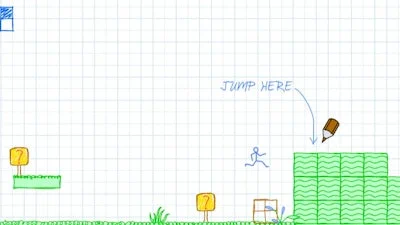
Imagine being stuck in a boring class, then pulling out a pencil and turning the desk into a playground. That’s the core of Draw Story, a flash‑style platformer where your imagination is the only tool you own. Every level is a blank canvas, every obstacle a chance to sketch a solution. The art you create becomes solid ground, a bridge, or a weapon – and the faster you think, the quicker the boredom disappears. Minijuegos brings this quirky blend of art and logic to your browser, so you can test your creativity without any downloads.
Master the basics, then start drawing. The game uses a classic keyboard layout paired with the mouse for precision. Follow the list below to get moving:
Press the number keys or scroll the wheel to pick a drawing tool, aim with the cursor, and click to place your creation. Each tool is limited, so plan every stroke. A well‑placed platform can save you from a falling death, while a floating bridge can carry you over a watery abyss.
Success in Draw Story hinges on two things: timing and foresight. Start each level by surveying the layout. Identify the highest gap, then choose the “solid platform” tool to create a temporary stepping stone. Remember, some platforms disappear after a few seconds – treat them like flash‑based hazards and keep moving. When you encounter enemies, switch to the “spike” item and draw a narrow barrier right in their path; they’ll bounce back, buying you precious seconds.
Conserve your drawing stock. The game rewards players who reuse existing structures. If you’ve built a sturdy block, walk back and stand on it to reach a new area instead of wasting another item. Combine logic puzzles with platform jumps: a floating platform can be placed over water, but if the water rises, switch to a “sink‑proof” version. The more you experiment, the deeper the satisfaction.
Ready to turn a dull lecture into a masterpiece of movement? Jump into Draw Story on Minijuegos and prove that your sketchbook beats any textbook. Grab your virtual pencil, outsmart every obstacle, and watch the canvas come alive with each clever platform you create.

We use cookies to help you navigate efficiently and perform certain functions. You will find detailed information about all cookies under each consent category below.
The cookies that are categorised as "Necessary" are stored on your browser as they are essential for enabling the basic functionalities of the site.
Necessary cookies are required to enable the basic features of this site, such as providing secure log-in or adjusting your consent preferences. These cookies do not store any personally identifiable data.
Functional cookies help perform certain functionalities like sharing the content of the website on social media platforms, collecting feedback, and other third-party features.
Analytical cookies are used to understand how visitors interact with the website. These cookies help provide information on metrics such as the number of visitors, bounce rate, traffic source, etc.
Advertisement cookies are used to provide visitors with customised advertisements based on the pages you visited previously and to analyse the effectiveness of the ad campaigns.
We also use third-party cookies that help us analyse how you use this website, store your preferences, and provide the content and advertisements that are relevant to you. These cookies will only be stored in your browser with your prior consent.
You can choose to enable or disable some or all of these cookies but disabling some of them may affect your browsing experience.