Click to play
x
Controls

Controls

  • [Action]: [Keyboard input] -- [Gamepad input]
  • Move: WSAD/Arrows -- Left Stick/D-Pad
  • Jump: Space bar/C -- Bottom Face/Left Bumper
  • Punch: P/Z -- Left Face/Right Face + Direction
  • Dash: O/X -- Top Face/Right Bumper + Direction
  • Break Attack: Hold Dash + Press Punch + Direction (can also be done with the Right Stick on Gamepad)

Notes

  • Has full gamepad support
  • Remap inputs in the options menu
  • "Tap up to Jump" can be set
  • Gamepad Stick Deadzone can be set between 10% and 85% of the gate radius
  • The game is currently only playable in Chromium-based browsers, e.g. Chrome

To ensure your gamepad controls are working, you can open a Visualizer for your inputs by going to Options -> Video -> Display Inputs. These show the real-time inputs from your controller regardless of what's happening in the game.

Advent NEON

Advent NEON

Advent NEON
Click to play
This game is not available on mobile.
rotate phone

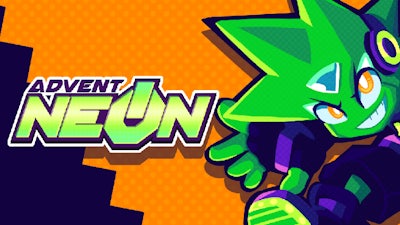
Advent NEON – Neon‑fueled Side‑Scrolling Action on Minijuegos

Pixel‑sharp neon lights blaze across a 2D platform that never slows down. You blaze through corridors, smash robotic foes, and tear down barriers with relentless speed. Every jump feels like a beat, every dash a punch in a high‑octane battle. If you crave a fast‑paced fighting experience that rewards precision, this is the arena you’ve been hunting.

Controls & Gameplay

Master the controller or keyboard and dominate the neon‑lit battlefield. The game reads your inputs in real time, so you can tweak deadzones and remap keys to fit your style. Below is the full control scheme:

  • Move: WSAD / Arrow keys — Left Stick / D‑Pad
  • Jump: Space bar / C — Bottom Face / Left Bumper
  • Punch: P / Z — Left Face / Right Face + Direction Dash (O / X)
  • Dash: O / X — Left Face / Right Face + Direction Dash
  • Break Attack: Hold Dash + Press Punch + Direction — Right Bumper + Direction (or Right Stick)
  • Full gamepad support; remap inputs in Options.
  • “Tap up to Jump” toggle available.
  • Gamepad stick deadzone adjustable from 10% to 85% of gate radius.
  • Only playable in Chromium‑based browsers (Chrome, Edge, etc.).
  • Open the Input Visualizer via Options → Video → Display Inputs to confirm controller signals.
Advent NEON Gameplay

Strategy & Replay Value

Speed isn’t the only weapon—timing is. Chain dashes into break attacks to vaporize clusters of enemies before they react. The longer you keep the combo alive, the higher the score multiplier, so keep moving and avoid getting locked in a corner. Hidden platforms reward exploration; each secret path drops a power‑up that lets you destroy tougher foes or extend your dash distance. Master the rhythm of the beat, learn enemy patterns, and you’ll turn every run into a flawless showcase.

Ready to light up the arena? Jump onto Advent NEON now, smash through waves, and prove you’re the ultimate neon fighter. Play it free on Minijuegos and let the neon blaze guide your next high‑score battle.

Instructions:

Controls

  • [Action]: [Keyboard input] -- [Gamepad input]
  • Move: WSAD/Arrows -- Left Stick/D-Pad
  • Jump: Space bar/C -- Bottom Face/Left Bumper
  • Punch: P/Z -- Left Face/Right Face + Direction
  • Dash: O/X -- Top Face/Right Bumper + Direction
  • Break Attack: Hold Dash + Press Punch + Direction (can also be done with the Right Stick on Gamepad)

Notes

  • Has full gamepad support
  • Remap inputs in the options menu
  • "Tap up to Jump" can be set
  • Gamepad Stick Deadzone can be set between 10% and 85% of the gate radius
  • The game is currently only playable in Chromium-based browsers, e.g. Chrome

To ensure your gamepad controls are working, you can open a Visualizer for your inputs by going to Options -> Video -> Display Inputs. These show the real-time inputs from your controller regardless of what's happening in the game.


Customise Consent Preferences Close

We use cookies to help you navigate efficiently and perform certain functions. You will find detailed information about all cookies under each consent category below.

The cookies that are categorised as "Necessary" are stored on your browser as they are essential for enabling the basic functionalities of the site.

Always Active

Necessary cookies are required to enable the basic features of this site, such as providing secure log-in or adjusting your consent preferences. These cookies do not store any personally identifiable data.
Functional cookies help perform certain functionalities like sharing the content of the website on social media platforms, collecting feedback, and other third-party features.

Analytical cookies are used to understand how visitors interact with the website. These cookies help provide information on metrics such as the number of visitors, bounce rate, traffic source, etc.

Advertisement cookies are used to provide visitors with customised advertisements based on the pages you visited previously and to analyse the effectiveness of the ad campaigns.

We also use third-party cookies that help us analyse how you use this website, store your preferences, and provide the content and advertisements that are relevant to you. These cookies will only be stored in your browser with your prior consent.

You can choose to enable or disable some or all of these cookies but disabling some of them may affect your browsing experience.