Click to play
x
Controls

Controls

Full controller support : Can be played with keyboard, mouse, touch, gamepad, etc.

Go back, close menu, pause game

  • Keyboard - [ Esc / X / Numpad - ]
  • Gamepad - [ Cancel (East) ]

Click or press menu buttons

  • Keyboard - [ Submit (Enter) / Space ]
  • Gamepad - [ Submit (South) ]

Navigate menu buttons

  • Keyboard - [ WASD / Arrow keys ]
  • Gamepad - [ D-pad / Any stick ]

Move left

  • Keyboard - [ A / Left arrow ]
  • Gamepad - [ D-pad Left / Any stick Left ]

Move right

  • Keyboard - [ D / Right arrow ]
  • Gamepad - [ D-pad Right / Any stick Right ]

Move down

  • Keyboard - [ S / Down arrow ]
  • Gamepad - [ D-pad Down / Any stick Down ]

Slam down

  • Keyboard - [ Shift / K ]
  • Gamepad - [ West ]

Rotate clockwise

  • Keyboard - [ W / L / Up arrow ]
  • Gamepad - [ North / D-pad Up / Right shoulder ]

Rotate anti-clockwise

  • Keyboard - [ Ctrl / J ]
  • Gamepad - [ Left shoulder ]

Full screen / window mode

  • Keyboard - [ F11 ]
ColorTris

ColorTris

ColorTris
Click to play
This game is not available on mobile.
rotate phone

ColorTris Brings Fresh Energy to Classic 2D Puzzle Action

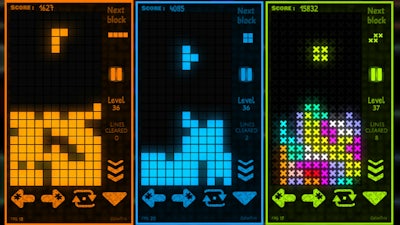
ColorTris is a high-speed, brain-busting 2D puzzle game that takes a fresh spin on the beloved mechanics of Tetris. With bold colors, fast action, and a clean visual style, it's the kind of gameplay that hooks you in seconds and keeps you challenged for hours. Whether you're a seasoned puzzle pro or a casual gamer, ColorTris delivers the perfect balance of strategy and fun. This is the kind of game that makes you want to clear line after line, chase higher scores, and outsmart the falling blocks with every move. ColorTris Gameplay
How to Play: Full Controller Support for Every Player

ColorTris is built for accessibility and flexibility—play your way, wherever you want. The game supports a wide range of input methods, including keyboard, mouse, touch, and gamepad. Here's how it works:
  • Pause Game: Keyboard - [ Esc / X / Numpad - ] | Gamepad - [ Cancel (East) ]
  • Click or Press Menu Buttons: Keyboard - [ Enter / Space ] | Gamepad - [ Submit (South) ]
  • Navigate Menu Buttons: Keyboard - [ WASD / Arrow keys ] | Gamepad - [ D-pad / Any stick ]
  • Move Left: Keyboard - [ A / Left arrow ] | Gamepad - [ D-pad Left / Any stick Left ]
  • Move Right: Keyboard - [ D / Right arrow ] | Gamepad - [ D-pad Right / Any stick Right ]
  • Move Down: Keyboard - [ S / Down arrow ] | Gamepad - [ D-pad Down / Any stick Down ]
  • Slam Down: Keyboard - [ Shift / K ] | Gamepad - [ West ]
  • Rotate Clockwise: Keyboard - [ W / L / Up arrow ] | Gamepad - [ North / D-pad Up / Right shoulder ]
  • Rotate Anti-Clockwise: Keyboard - [ Ctrl / J ] | Gamepad - [ Left shoulder ]
  • Full Screen / Window Mode: Keyboard - [ F11 ]

Master the Color Grid: Strategy Meets Skill

What sets ColorTris apart is how it blends strategy with reflexes. Every move counts, and timing is everything. Focus on color patterns to maximize line clears and trigger chain reactions. Learn to anticipate the next piece and plan ahead. As the speed increases, your focus and precision must too. The more you play, the better your skills sharpen. It’s not just about luck—it’s about Skill, Color, and that satisfying pop of a perfectly aligned block.

ColorTris also includes multiple themes and color schemes that keep the gameplay fresh and visually stimulating. Each theme changes the look of the grid and the blocks, giving you a reason to come back and try new combinations. The game rewards those who think fast and act faster, making it a true test of 2D puzzle mastery.

Ready to take on the challenge? Head over to ColorTris and join the millions of players who love the fast-paced, color-filled action. And don’t forget to check out more free games at Minijuegos—because the best games are always just a click away.

Instructions:

Controls

Full controller support : Can be played with keyboard, mouse, touch, gamepad, etc.

Go back, close menu, pause game

  • Keyboard - [ Esc / X / Numpad - ]
  • Gamepad - [ Cancel (East) ]

Click or press menu buttons

  • Keyboard - [ Submit (Enter) / Space ]
  • Gamepad - [ Submit (South) ]

Navigate menu buttons

  • Keyboard - [ WASD / Arrow keys ]
  • Gamepad - [ D-pad / Any stick ]

Move left

  • Keyboard - [ A / Left arrow ]
  • Gamepad - [ D-pad Left / Any stick Left ]

Move right

  • Keyboard - [ D / Right arrow ]
  • Gamepad - [ D-pad Right / Any stick Right ]

Move down

  • Keyboard - [ S / Down arrow ]
  • Gamepad - [ D-pad Down / Any stick Down ]

Slam down

  • Keyboard - [ Shift / K ]
  • Gamepad - [ West ]

Rotate clockwise

  • Keyboard - [ W / L / Up arrow ]
  • Gamepad - [ North / D-pad Up / Right shoulder ]

Rotate anti-clockwise

  • Keyboard - [ Ctrl / J ]
  • Gamepad - [ Left shoulder ]

Full screen / window mode

  • Keyboard - [ F11 ]
Customise Consent Preferences Close

We use cookies to help you navigate efficiently and perform certain functions. You will find detailed information about all cookies under each consent category below.

The cookies that are categorised as "Necessary" are stored on your browser as they are essential for enabling the basic functionalities of the site.

Always Active

Necessary cookies are required to enable the basic features of this site, such as providing secure log-in or adjusting your consent preferences. These cookies do not store any personally identifiable data.

Functional cookies help perform certain functionalities like sharing the content of the website on social media platforms, collecting feedback, and other third-party features.

Analytical cookies are used to understand how visitors interact with the website. These cookies help provide information on metrics such as the number of visitors, bounce rate, traffic source, etc.

Advertisement cookies are used to provide visitors with customised advertisements based on the pages you visited previously and to analyse the effectiveness of the ad campaigns.

We also use third-party cookies that help us analyse how you use this website, store your preferences, and provide the content and advertisements that are relevant to you. These cookies will only be stored in your browser with your prior consent.

You can choose to enable or disable some or all of these cookies but disabling some of them may affect your browsing experience.