Controls
Use the left mouse button to start coloring (follow in-game instructions to use keyboard control).
Use the left mouse button to start coloring (follow in-game instructions to use keyboard control).
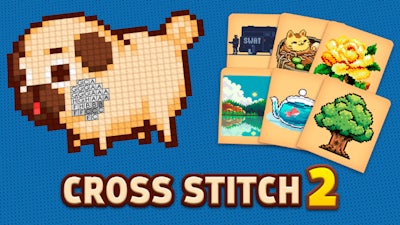


Imagine a 2D canvas where every square is a pixel waiting for your touch. Cross Stitch 2 transforms that idea into a fast‑paced coloring showdown. You’re handed a grid of numbered cells, each linked to a specific hue. Fill the pattern, watch the picture pop into life, and score points that climb with every flawless stitch. The game’s sleek pixel art style makes each completed image look like a retro masterpiece, perfect for short breaks or marathon sessions. Whether you’re a casual player or a hardcore perfectionist, the instant visual payoff keeps you glued to the screen.
The core loop is simple, but mastery demands precision. The interface is built for mouse‑centric play, letting you click, drag, and color with lightning speed. Controls are straightforward: Use the left mouse button to start coloring (follow in-game instructions to use keyboard control).
Start with the beginner patterns—they’re designed to teach you the rhythm of pixel‑by‑pixel coloring. As you advance, grids grow larger and color palettes become more nuanced, demanding sharper eye‑hand coordination. A key tactic: memorize the most frequent color sequences and pre‑select them before you begin a new stitch. This reduces mouse travel and speeds up completion times, boosting your score multiplier. The game also rewards streaks; every uninterrupted chain of correct placements adds a bonus that can turn a good run into a great one. Keep an eye on the timer—quick, accurate work unlocks hidden designs that add depth to the collection.
Ready to prove you’ve got the fastest fingers on the internet? Jump into Cross Stitch 2 on Minijuegos and start racking up points. The vibrant pixel art, addictive scoring system, and razor‑sharp mouse controls make every session feel fresh. Play now, beat your high score, and share your masterpiece with the community. The canvas is waiting—pick up that mouse and stitch your way to the top.
Use the left mouse button to start coloring (follow in-game instructions to use keyboard control).

We use cookies to help you navigate efficiently and perform certain functions. You will find detailed information about all cookies under each consent category below.
The cookies that are categorised as "Necessary" are stored on your browser as they are essential for enabling the basic functionalities of the site.
Necessary cookies are required to enable the basic features of this site, such as providing secure log-in or adjusting your consent preferences. These cookies do not store any personally identifiable data.
Functional cookies help perform certain functionalities like sharing the content of the website on social media platforms, collecting feedback, and other third-party features.
Analytical cookies are used to understand how visitors interact with the website. These cookies help provide information on metrics such as the number of visitors, bounce rate, traffic source, etc.
Advertisement cookies are used to provide visitors with customised advertisements based on the pages you visited previously and to analyse the effectiveness of the ad campaigns.
We also use third-party cookies that help us analyse how you use this website, store your preferences, and provide the content and advertisements that are relevant to you. These cookies will only be stored in your browser with your prior consent.
You can choose to enable or disable some or all of these cookies but disabling some of them may affect your browsing experience.