Click to play
x
Controls

Controls

  • "P" to show/hide car selector
  • "WASD", "arrows" to drive car and helicopter, and to move while on foot
  • "Space bar" to use the handbrake
  • "E" to exit/enter from the car
  • "F" to get in/get out in the car like as a passenger
  • "Q" to pause/play radio
  • "SHIFT" to use nitro
  • "G" to get the car up
  • "R" to signal
  • "V" to seek rocket on the helicopter
  • "l" to use the light on 3d person
  • "l" to start/stop the engine on the helicopter
  • "c" to change the camera view
  • "Enter" to type in chat
  • "ESC" to return to the menu
Free Rally: Vice

Free Rally: Vice

Free Rally: Vice
Click to play
This game is not available on mobile.
rotate phone

Free Rally: Vice – High‑Octane 3D Street Mayhem

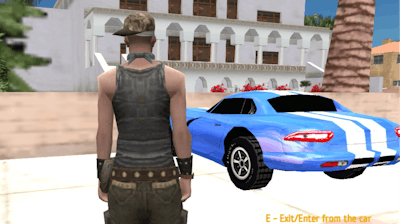
Minijuegos drops you into a sprawling metropolis where chaos reigns and every corner hides a new challenge. As a driver, passenger, or pilot, you control the most aggressive car lineup ever built for a multiplayer showdown. The city’s neon‑lit streets, towering garages, and hidden helipads turn every race into a living simulation of urban warfare. Miss a turn and a rival helicopter will spot you from above, ready to swoop in and steal the spotlight.

Free Rally: Vice Controls

Master the arena with a tight set of inputs. Every key has a purpose, and the learning curve is razor‑thin. Grab the wheel, fire the nitro, or hop into a passenger seat in seconds.

  • P – toggle the car selector.
  • WASD – steer your car on the ground.
  • Arrow keys – pilot the helicopter or drive on foot.
  • Space bar – activate the handbrake.
  • E – exit or enter any vehicle.
  • F – grab a seat as a passenger.
  • Q – pause or play the radio.
  • SHIFT – unleash nitro boost.
  • G – lift the car for a quick jump.
  • R – flash your signal lights.
  • V – lock onto rockets while in the helicopter.
  • L – toggle the 3D‑person view light or start/stop the helicopter engine.
  • C – cycle camera perspectives.
  • Enter – open chat for team talk.
  • ESC – return to the main menu.
Free Rally: Vice Gameplay

Winning the Streets

Success isn’t just about raw speed; it’s about timing, positioning, and resource management. Start each match by scouting the map for repair garages—repairing a battered car before a showdown can be the difference between victory and a spectacular crash. Keep an eye on the helicopter pads; a well‑timed lift can bypass traffic jams and launch you straight into the leader’s rear view. Use nitro sparingly; a burst at the right moment can vault you over obstacles or shave seconds off a tight corner.

Teamplay thrives in Free Rally: Vice. Pair up with a friend, let one pilot the helicopter for aerial support while the other dominates the streets. Communicate via the chat (Enter) to coordinate rocket strikes (V) or signal a quick garage stop (R). The third‑person 3D view lets you anticipate opponent moves, making it easier to block passes or set up ambushes. As you rack up wins, unlock faster engines, tougher chassis, and custom paint jobs that scream dominance.

Ready to dominate the city? Jump straight into the action on Free Rally: Vice and feel the rush of a true simulation where every second counts. Minijuegos brings you the ultimate blend of high‑speed racing and aerial combat—no tutorials, just pure, unfiltered adrenaline. Press start, lock in your favorite ride, and let the streets decide who’s the real king of chaos.


Instructions:

Controls

  • "P" to show/hide car selector
  • "WASD", "arrows" to drive car and helicopter, and to move while on foot
  • "Space bar" to use the handbrake
  • "E" to exit/enter from the car
  • "F" to get in/get out in the car like as a passenger
  • "Q" to pause/play radio
  • "SHIFT" to use nitro
  • "G" to get the car up
  • "R" to signal
  • "V" to seek rocket on the helicopter
  • "l" to use the light on 3d person
  • "l" to start/stop the engine on the helicopter
  • "c" to change the camera view
  • "Enter" to type in chat
  • "ESC" to return to the menu
Customise Consent Preferences Close

We use cookies to help you navigate efficiently and perform certain functions. You will find detailed information about all cookies under each consent category below.


The cookies that are categorised as "Necessary" are stored on your browser as they are essential for enabling the basic functionalities of the site.

Always Active

Necessary cookies are required to enable the basic features of this site, such as providing secure log-in or adjusting your consent preferences. These cookies do not store any personally identifiable data.

Functional cookies help perform certain functionalities like sharing the content of the website on social media platforms, collecting feedback, and other third-party features.

Analytical cookies are used to understand how visitors interact with the website. These cookies help provide information on metrics such as the number of visitors, bounce rate, traffic source, etc.

Advertisement cookies are used to provide visitors with customised advertisements based on the pages you visited previously and to analyse the effectiveness of the ad campaigns.

We also use third-party cookies that help us analyse how you use this website, store your preferences, and provide the content and advertisements that are relevant to you. These cookies will only be stored in your browser with your prior consent.

You can choose to enable or disable some or all of these cookies but disabling some of them may affect your browsing experience.