Conquer the wilds in MooMoo.io — the ultimate .io survival showdown
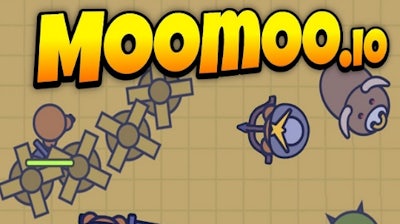
MooMoo.io isn’t just another .io title — it’s a high-octane battle between survival, strategy, and domination. The goal is simple: collect resources, build, and outlast the competition. Fight for control of valuable zones, defend your base from enemy invasions, and climb the rankings by gathering wood, stone, and food. With every resource you gather, every wall you build, and every windmill you construct, you inch closer to victory. Whether you're playing solo or teaming up, MooMoo.io throws you into a fast-paced environment where every decision counts. This is where Building, Survival, and Crafting collide into one addictive package. And it's all available for free at Minijuegos — no downloads, no fluff.
Controls are responsive and intuitive to get you playing fast. Here’s how it all works:
- Move using WASD or arrow keys
- Press 1 to 9 or left click to select items or buildings
- Left click or press Space to gather resources or attack other players
- Press E to toggle auto-attack mode
- Hit Q to quickly select food
- Press X to lock rotation of buildings for placement
- Hit R to ping locations on the minimap
- Use C to add markers on the map
- Press Enter to open the chat and connect with players
These controls give you the flexibility to build, fight, and adapt in real time — making MooMoo.io a standout in the Multiplayer .io world. It’s easy to pick up but tough to master, especially when enemies are constantly on the hunt.
Master MooMoo.io with strategy and speed
Surviving in MooMoo.io isn’t just about collecting resources — it’s about timing and positioning. The right strategy can make all the difference. Set up your base in a defensible zone, use walls to protect your resources, and build windmills to generate steady points. Watch for hostile players, and always have food ready to restore your health. Level up strategically: choose upgrades that fit your playstyle — whether that’s more health, faster gathering, or increased attack power.
What keeps players coming back? The constant threat of ambushes, the thrill of expansion, and the satisfaction of watching your base grow. MooMoo.io is a perfect blend of building, crafting, and survival — with every match offering a new challenge. And with Minijuegos regularly updating game content and hosting tournaments, there’s always something fresh to play.
So what are you waiting for? Head over to MooMoo.io and start gathering. Build your empire, fight for dominance, and claim your spot on the leaderboard. Minijuegos has got your back — always free, always fun. Play now and see who reigns supreme.