Controls
Keyboard
- WASD or arrow keys = move
- Q = use binoculars
- P = pause
- R = restart
Controller
- Left Stick/D-Pad = move
- Y = use binoculars
- Start = pause/resume
- Select = restart
Controller
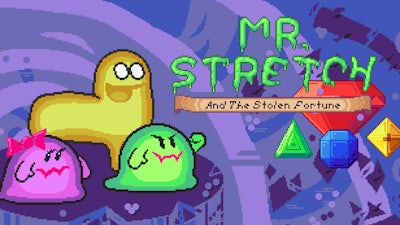


Mr. Stretch’s treasure was snatched by a shadowy rival, and the only way to get it back is to sprint across crumbling manor roofs, dodge every obstacle, and out‑smart a sly Snake that slithers through the corridors. Every level feels like a high‑stakes heist: you’ll collect glittering gems, chain combo moves, and chase perfect scores while the clock ticks. If you love tight platform puzzles that punish hesitation, this demo drops you into 20 hand‑crafted stages that demand reflexes and quick thinking. Play now on Mr. Stretch and the Stolen Fortune and see why Minijuegos’ latest title is the talk of the arcade.
Control is simple, but mastery is brutal. Use your keyboard or controller to glide, jump, and scan the environment. Timing each move matters—one slip and you’ll Avoid a costly respawn.
First, map each platform before you sprint. Spot the Snake patrol routes and plan a path that lets you collect the biggest gem clusters without triggering enemy sight. Use the binoculars sparingly; they reveal hidden switches that open shortcuts, but the cooldown forces you to stay aware of every jump. When you see a tight gap, hold the move key a fraction longer to gain extra distance—this “stretch” technique shaves seconds off your time and boosts combo multipliers. Keep an eye on the level timer; early victories grant extra lives that let you Avoid costly restarts. Finally, replay each stage to perfect your route; the game rewards flawless runs with secret vault keys that unlock bonus content.
Ready to stretch your skills and claim the stolen loot? Jump straight into the action on Minijuegos and prove you can out‑run every trap, out‑think every foe, and bring the fortune back where it belongs.
Controller

We use cookies to help you navigate efficiently and perform certain functions. You will find detailed information about all cookies under each consent category below.
The cookies that are categorised as "Necessary" are stored on your browser as they are essential for enabling the basic functionalities of the site.
Necessary cookies are required to enable the basic features of this site, such as providing secure log-in or adjusting your consent preferences. These cookies do not store any personally identifiable data.
Functional cookies help perform certain functionalities like sharing the content of the website on social media platforms, collecting feedback, and other third-party features.
Analytical cookies are used to understand how visitors interact with the website. These cookies help provide information on metrics such as the number of visitors, bounce rate, traffic source, etc.
Advertisement cookies are used to provide visitors with customised advertisements based on the pages you visited previously and to analyse the effectiveness of the ad campaigns.
We also use third-party cookies that help us analyse how you use this website, store your preferences, and provide the content and advertisements that are relevant to you. These cookies will only be stored in your browser with your prior consent.
You can choose to enable or disable some or all of these cookies but disabling some of them may affect your browsing experience.